Vault and files
Every note is a plain Markdown file on disk. Here is how that works.
Shady Notes has no database and no proprietary format. Every note is a .md
file in a folder you choose.
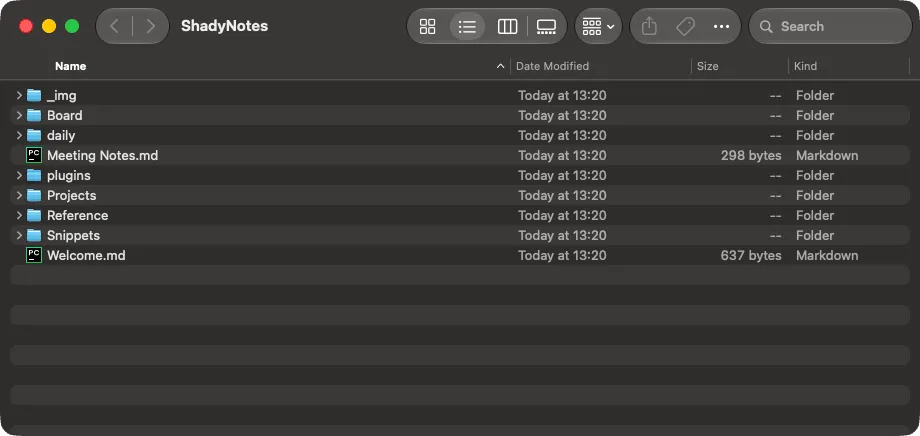
The default location is:
~/Documents/ShadyNotes/What that buys you
Section titled “What that buys you”- Nothing is locked in. Open the same folder in Obsidian, VS Code,
vim, or anything else. Edits made elsewhere appear in Shady Notes. - Your existing tools work. Back it up with Time Machine, sync it with iCloud Drive or Dropbox, put it in a git repo.
- Uninstalling loses nothing. Delete the app and the notes are still there.
File trees
Section titled “File trees”You are not limited to one folder. Shady Notes shows one or more file trees, each a root folder somewhere on disk — say a personal vault, a work notes folder, and a code repository’s docs directory.
Add and remove them in Preferences → Vault. Each tree can:
- carry a display name different from its folder name
- auto-track new files it discovers
- be marked inactive, which keeps it out of the combined Navigator view while still being reachable from its own filter
Trees are the raw folders. Workspaces are how you group them into working contexts.
Attachments
Section titled “Attachments”Images pasted or dragged into a note are written into an attachments folder
alongside your notes — _img/ by default, configurable in
Preferences → Editor. See Images.
Filenames
Section titled “Filenames”New notes are named according to the naming strategy in Preferences → Vault — from the first heading, from the date, or prompted.
What is not in the vault
Section titled “What is not in the vault”Your notes and attachments are on disk. Everything else — window size, theme, open tabs, workspace setup, starred notes, keyboard bindings — lives in macOS preferences, not in the vault. Copying the folder to another Mac brings the notes, not the layout.
Version history is separate again: a git repository outside the vault, so it never clutters the folder. See The git backend.
Documented against Shady Notes 4.1.19 · release notes