Sticky notes
Float a single note in its own small window.
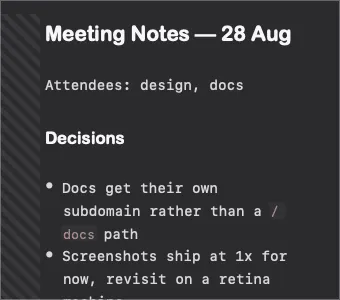
A sticky note is one note in its own small floating window, independent of the shade. Useful for something you want visible while working in another app — a checklist, a scratchpad, a set of commands.
Opening one
Section titled “Opening one”Assign a global hotkey in Preferences → Shortcuts — it is unset by default — or open one from the note’s context menu.
Behaviour
Section titled “Behaviour”- Floats above ordinary windows
- Independent of the shade: closing the shade leaves sticky notes open
- Edits are the same file, saved the same way — a sticky note is a view of a note, not a copy
- Position and size persist across restarts
Options
Section titled “Options”Two settings in Preferences → Appearance:
- Sticky note border — draw a border around the window
- Collapse snap — snap to a collapsed height when dragged small, so a note can be tucked to a title bar and expanded later
Sticky notes vs. the shade
Section titled “Sticky notes vs. the shade”| Shade | Sticky note | |
|---|---|---|
| How many | One | As many as you like |
| Tabs | Yes | No — one note each |
| Sidebar | Yes | No |
| Opens on | Scroll or hotkey | Hotkey or context menu |
| Best for | Working in your notes | Keeping one note in view |
Documented against Shady Notes 4.1.19 · release notes