Writing a plugin
Build your own plugin with the front-matter DSL.
Premium Part of the plugin platform. See Licensing.
A plugin is a Markdown file. No build step, no toolchain, no restart — a definition in front matter, and the app renders it.
The shape
Section titled “The shape”---plugin: my-bookshelfname: Bookshelficon: bookschema: - name: title type: string - name: rating type: numberquery: folder: Reading where: status == "finished" sort: rating desclayout: type: list fields: [title, rating]actions: - name: newBook label: Add a book template: "{{title}}.md"---Five parts:
| Part | Purpose |
|---|---|
schema | The front-matter fields this plugin reads |
query | Which notes to include, and in what order |
layout | How to draw them |
actions | Buttons, and what they create |
name / icon | How it appears in the sidebar |
Queries
Section titled “Queries”where takes an expression over front-matter fields and note metadata —
comparisons, boolean operators, and functions for dates and strings. sort takes
a field and a direction.
Layouts
Section titled “Layouts”Over thirty components are available: lists, tables, boards, cards, timelines,
counters and more. layout.type picks one and fields says which values it
shows.
Templates
Section titled “Templates”actions use a template engine for new-note filenames and content:
{{today | format 'yyyy-MM-dd'}}.mdFilters chain, so dates, string casing and defaults compose.
Theming
Section titled “Theming”Use the semantic theme tokens rather than fixed colours — accent, background, muted, and so on. A plugin written against them looks right in all sixteen themes, including the two that follow the workspace colour.
The escape hatch
Section titled “The escape hatch”When the DSL is not enough, a plugin can host a WebView and talk to the app
through window.shady.*. That trades the “it is just Markdown” simplicity for
arbitrary HTML and JavaScript — reach for it only when the declarative route
genuinely cannot express what you need.
Inspecting one
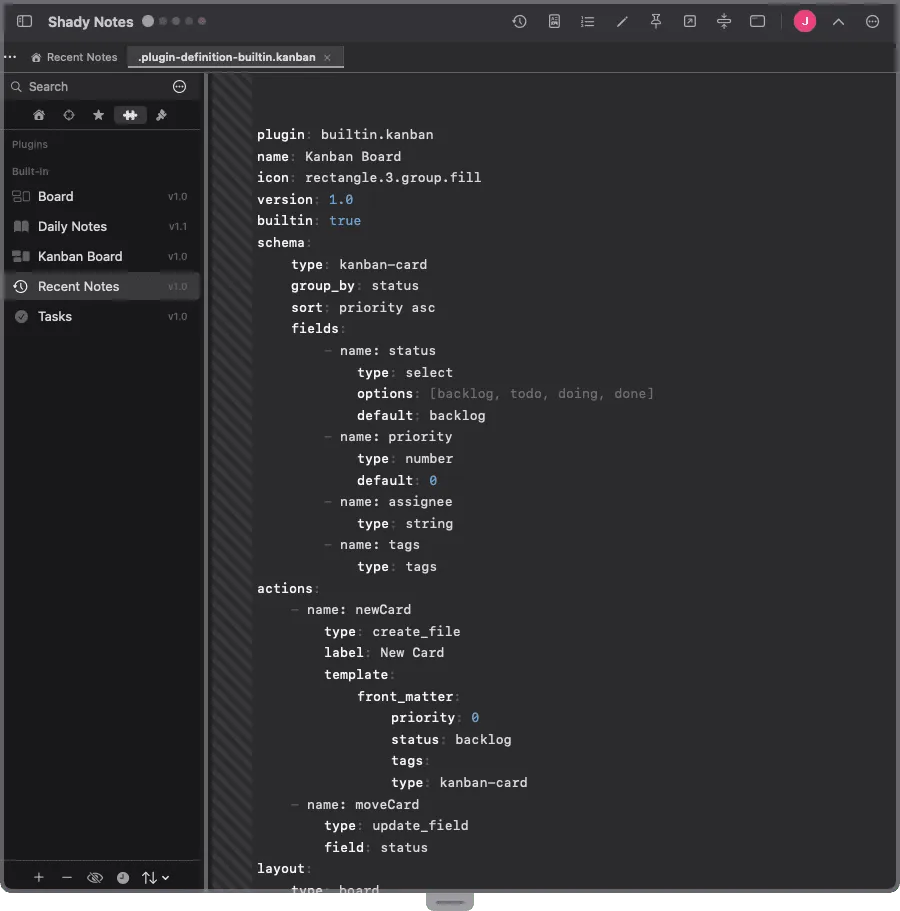
Section titled “Inspecting one”Any plugin’s View Definition shows its source, which is the quickest way to learn the DSL — open a built-in and read it.
Documented against Shady Notes 4.1.19 · release notes