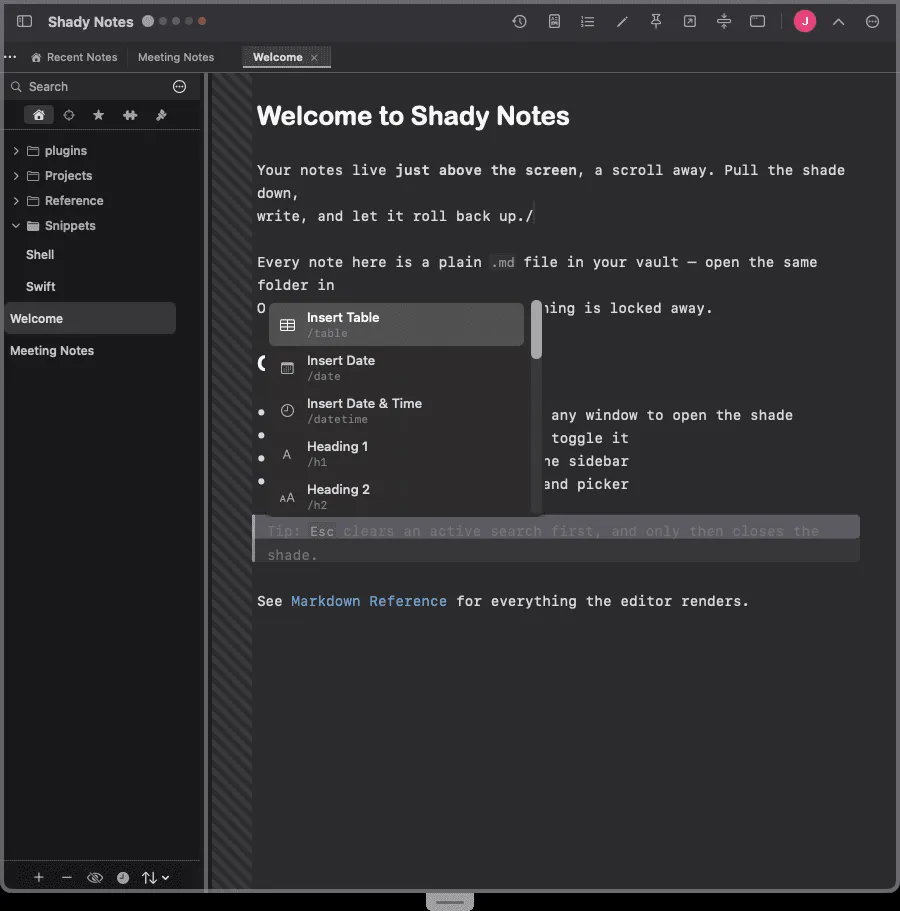
Slash commands
Insert dates, headings, tables, and code blocks without leaving the keyboard.
Type / at the start of a blank line, or press ⌘. anywhere, to open
the command picker. Type to filter, ↑↓ to move,
↵ to insert.
The commands
Section titled “The commands”Structure
Section titled “Structure”| Command | Inserts |
|---|---|
/h1 /h2 /h3 | A heading prefix |
/list | A bullet list item |
/numbered | A numbered list item |
/todo | A task item |
/checkbox | A standalone checkbox |
/quote | A blockquote prefix |
/hr | A horizontal rule |
/table | A starter table |
Content
Section titled “Content”| Command | Inserts |
|---|---|
/date | Today’s date |
/datetime | Date and time |
/link | A link template |
/image | An image template |
/code | A fenced code block |
/callout | A callout, via the type picker |
/emoji | The emoji picker |
/kitchensink | A note demonstrating every Markdown feature |
Cursor placement
Section titled “Cursor placement”Commands that insert a template park the cursor where you will actually type.
/link leaves it in the link text, not after the closing bracket.
Documented against Shady Notes 4.1.19 · release notes