Checkboxes
Toggle tasks from the keyboard, in lists, standalone, or inside tables.
The two shortcuts
Section titled “The two shortcuts”⌘T is context-aware. What it does depends on the line the cursor is on:
| Cursor is on | ⌘T does |
|---|---|
| A line with a checkbox | Toggles between [ ] and [x] |
| A blank line | Inserts a standalone [ ] |
A list item (-, *, 1.) | Inserts [ ] after the marker |
⇧⌘T adds or removes the checkbox itself, rather than ticking it.
You can also just click a checkbox to toggle it.
Standalone checkboxes
Section titled “Standalone checkboxes”Most Markdown editors need a list marker before a task. Shady Notes does not:
[ ] This is a task[x] So is thisHandy for a short checklist that doesn’t want to be a bulleted list.
In tables
Section titled “In tables”Checkboxes work inside table cells too, and stay clickable there:
| Task | Done ||---|---|| Draft the copy | [x] || Review it | [ ] |Automatic continuation
Section titled “Automatic continuation”Press Return at the end of a task line and the next line starts as a task. Three settings in Preferences → Editor control this independently:
- continue lists
- continue checkbox lists
- continue checkboxes
An empty task line followed by Return ends the run, so you are never stuck in a list.
Parent tracking
Section titled “Parent tracking”With parent checkbox tracking on, ticking every child under a parent task ticks the parent too, and unticking one clears it again.
- [ ] Ship the docs - [x] Write the pages - [ ] Capture screenshotsTick the second child and the parent completes on its own.
Appearance
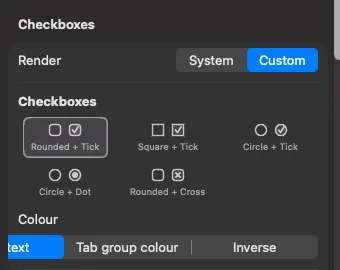
Section titled “Appearance”Five checkbox styles are available in Preferences → Editor: Rounded + Tick, Square + Tick, Circle + Tick, Circle + Dot, and Rounded + Cross. There is also a colour mode setting, and an option to use the system checkbox rendering instead.
Documented against Shady Notes 4.1.19 · release notes