Conflicts
What happens when a note changes outside Shady Notes while it is open.
Because notes are plain files, something else can change them while Shady Notes has them open — a sync client, another editor, a script. Shady Notes watches the vault and notices.
What it does
Section titled “What it does”You choose, in Preferences → Vault:
| Mode | Behaviour |
|---|---|
| Silent | Keep your version, say nothing |
| Notify | Keep your version, show a toast |
| Always ask | Stop and let you decide |
Notify is the sensible default: nothing is lost without telling you, but you are not interrupted mid-sentence.
When the file changed but you didn’t
Section titled “When the file changed but you didn’t”If the note has no unsaved changes of yours, the new content is simply loaded. That is not a conflict — it is the point of using plain files.
When both changed
Section titled “When both changed”Shady Notes attempts a three-way merge using the common ancestor. Edits in different parts of the note usually merge cleanly with no prompt.
When they overlap, an amber Merge conflict banner appears above the note offering Keep mine, Keep theirs and View diff. The editor is read-only until you choose, and nothing is overwritten until you do.
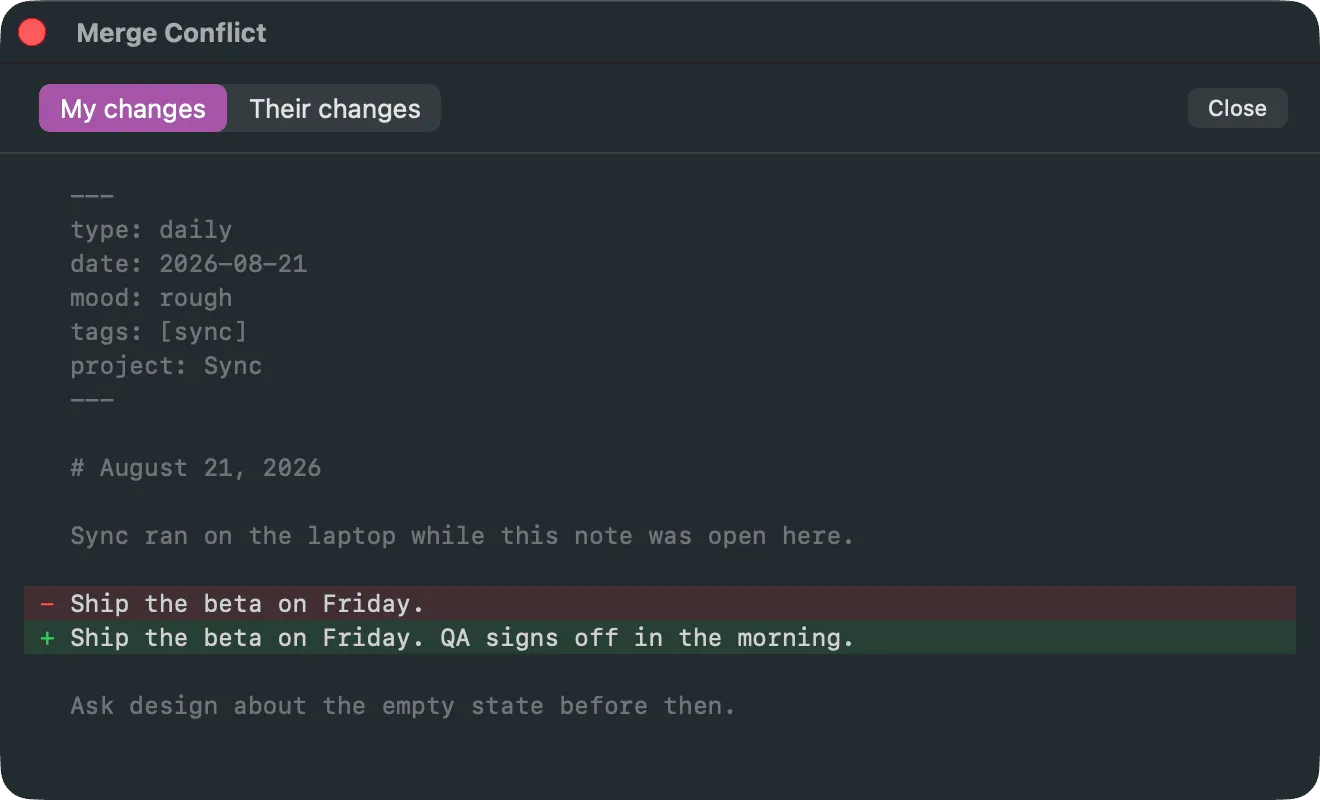
View diff opens the window above. It shows one version at a time — toggle between My changes and Their changes — each diffed against the common ancestor, so you can see what either side actually did before you choose.
Reducing conflicts
Section titled “Reducing conflicts”- Close notes you aren’t using — a note that isn’t open cannot conflict
- Let a sync finish before editing on the other machine
- Turn on revision history: even a bad merge is recoverable if every version was recorded
Documented against Shady Notes 4.1.19 · release notes